

🦀 GIFmeta
Fix GIF timing, loops and frames — without breaking optimized GIFs. A Rust crate, a CLI and a desktop app.


Most GIFs on the web are frame-optimized: each frame only stores the pixels that changed since the previous one. That keeps files small, but it means you can't just remove a frame or change one in isolation — every frame after it is drawn on top of the wrong picture, and the animation falls apart.
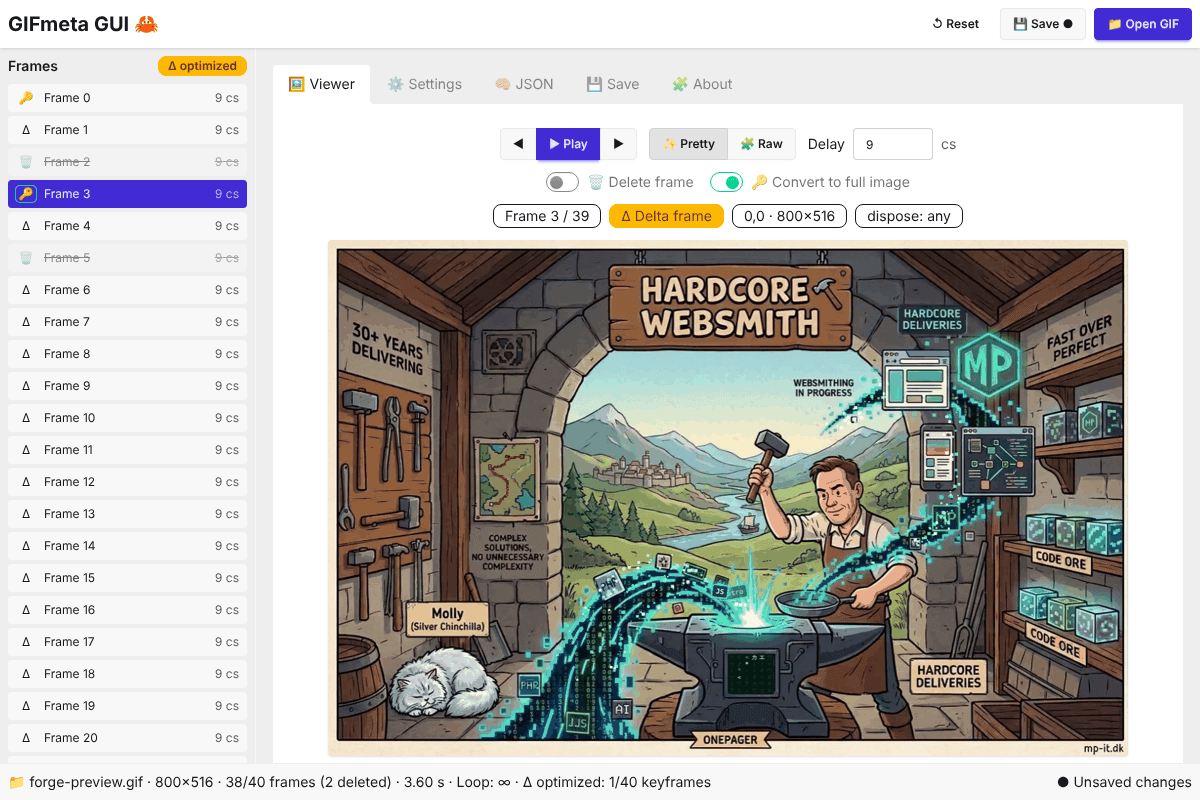
GIFmeta understands how those frames depend on each other. It shows you which frames are full images (🔑) and which are deltas (Δ), renders every frame exactly as it plays, and lets you change delays, loops and frames safely — deleting a frame automatically rebuilds the frames that depended on it, so the rest of the animation stays pixel-identical.
📦 Get it
Command line:
cargo install gifmetaAs a library:
cargo add gifmetaDesktop app (macOS · Windows · Linux): gifmeta-gui releases
CLI binaries: gifmeta releases
Crates.io: crates.io/crates/gifmeta · Docs: docs.rs/gifmeta · Changelog: CHANGELOG.md
🚀 Features
- 🔍 Inspect size, frame count, duration, palette, transparency and loop setting (also as JSON)
- 🔑 / Δ Detect frame-optimized GIFs: which frames are full images, which only store changes
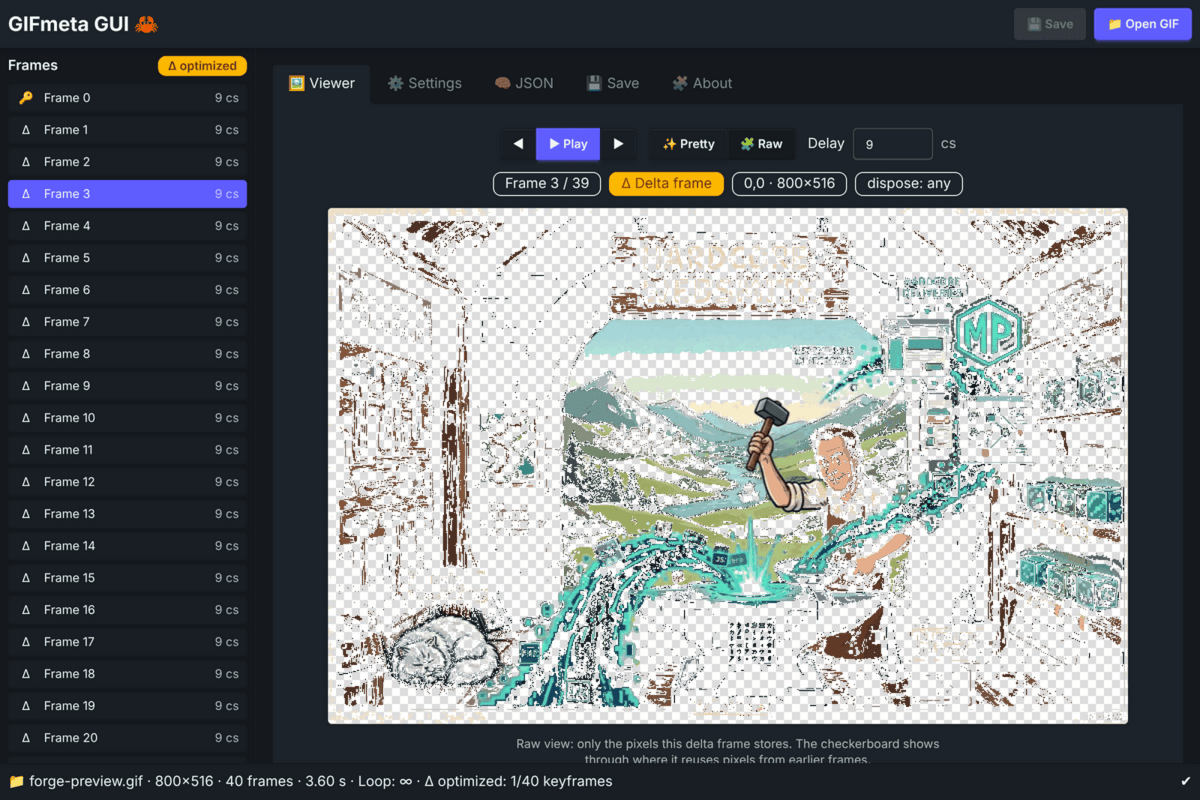
- ✨ Render any frame exactly as it plays (disposal-aware) — or 🧩 raw: only the pixels it stores
- ⚡ Render or export all frames in one pass (15–56× faster than frame by frame)
- ✂️ Delete frames safely — dependent frames are rebuilt, the delay moves to the previous frame
- 🔑 Convert selected frames to full images, or 🧱 unoptimize the whole GIF
- ⏱️ Set one delay for all frames or per frame
- 🔄 Loop forever or a fixed number of plays — "plays once" GIFs stay that way
💻 Example: from the command line
gifmeta info input.gif --show-frames            # 🔑 / Δ per frame, delays, disposal
gifmeta mod input.gif --delete 2,5 -o out.gif     # delete frames safely
gifmeta mod input.gif --infinite --delay 8 -o out.gif
gifmeta mod input.gif --unoptimize -o out.gif     # every frame a full image
gifmeta preview input.gif --all --output-dir frames/
🦀 Example: as a Rust crate
use gifmeta::{modify_gif_with_report, FrameRenderer, ModOptions, PreviewMode};

// Every frame exactly as it plays, in one pass
for frame in FrameRenderer::open("input.gif", PreviewMode::Composited)? {
    let frame = frame?; // RenderedFrame { index, delay_cs, image }
    frame.image.save(format!("frame_{:03}.png", frame.index))?;
}

// Delete frames; dependent frames are rebuilt automatically
let report = modify_gif_with_report(&"input.gif".into(), ModOptions {
    output: Some("out.gif".into()),
    delete_frames: Some(vec![2, 5]),
    ..Default::default()
})?;
println!("{} → {} frames, rebuilt {:?}", report.frames_in, report.frames_out, report.rekeyed);
🦀 Before & after: the original crab
The first GIFmeta mascot: a tiny 2-frame idle loop. One command makes the second frame snappier.


gifmeta mod crab.gif --delays 1=30 -o crab_modified.gif🧠 How safe frame deletion works
GIFmeta replays the original animation and the new one side by side. For every frame that stays, it compares the canvas the frame will be drawn on: if it matches the original, the frame is copied as-is (lossless); if it doesn't — because a frame it depended on was deleted — the frame is written as a full image of exactly how it looked before.
Usually only one or two frames need rebuilding. Rebuilt frames get an exact palette whenever possible; only frames with more than 256 colours are colour-reduced, with a warning. Tested on a 40-frame optimized GIF: 5 frames deleted, 35 of 35 remaining frames pixel-identical, 0.5 seconds.
🦀 GIFmeta GUI
A lightweight desktop app built with Tauri and Rust, powered by the gifmeta crate. Works offline on macOS, Windows and Linux.
- ▶ Play the GIF with your edited delays before saving
- 🔑 / Δ frame list, ✨ pretty / 🧩 raw view and per-frame info
- 🗑️ Delete frames (⌫) and 🔑 convert frames to full images — playback shows the result
- 🔄 Loop forever or a fixed number of plays, 🧱 unoptimize
- 💾 Native save dialog, unsaved-changes indicator and reset
- 📂 Drag & drop, ⌨️ keyboard shortcuts, light & dark theme
📦 Desktop app
📥 Download (.dmg · .msi · .AppImage)Source: github.com/madspaaskesen/gifmeta-gui · Install guide: INSTALL.md
🤝 Need image, video or desktop tooling?
I build Rust libraries, CLIs and Tauri desktop apps — media pipelines, file formats and the tooling around them — as Hardcore Websmith. I take on freelance work.
Selected Projects
A glimpse into the tools, love, and tech behind what I build.

Flixlar
Desktop caption editor for fast video workflows.
GIFmeta
Rust crate, CLI & desktop app: inspect GIFs, fix loops & delays, delete frames safely.
evmify
Open-source Rust crate: one API for EVM and non-EVM blockchains, always in EVM format.
whisper-captions
Open-source Rust crate: whisper.cpp output to caption-ready segments with word timings, SRT and VTT.

Aether Renderer
web2vid.com: web animations and PNG frames to transparent WebM, ProRes MOV, GIF or MP4. Desktop app, Rust crates & CLI.
mySiteChart
Lightweight service for visualizing analytics and user insight without complexity.
Sacred AI
A digital sanctuary for emotional healing and conflict resolution.
Digital Art Archive
Personal art and cultural preservation projects.
ownPost
Browser extension that lets you share your own articles to LinkedIn in one click.